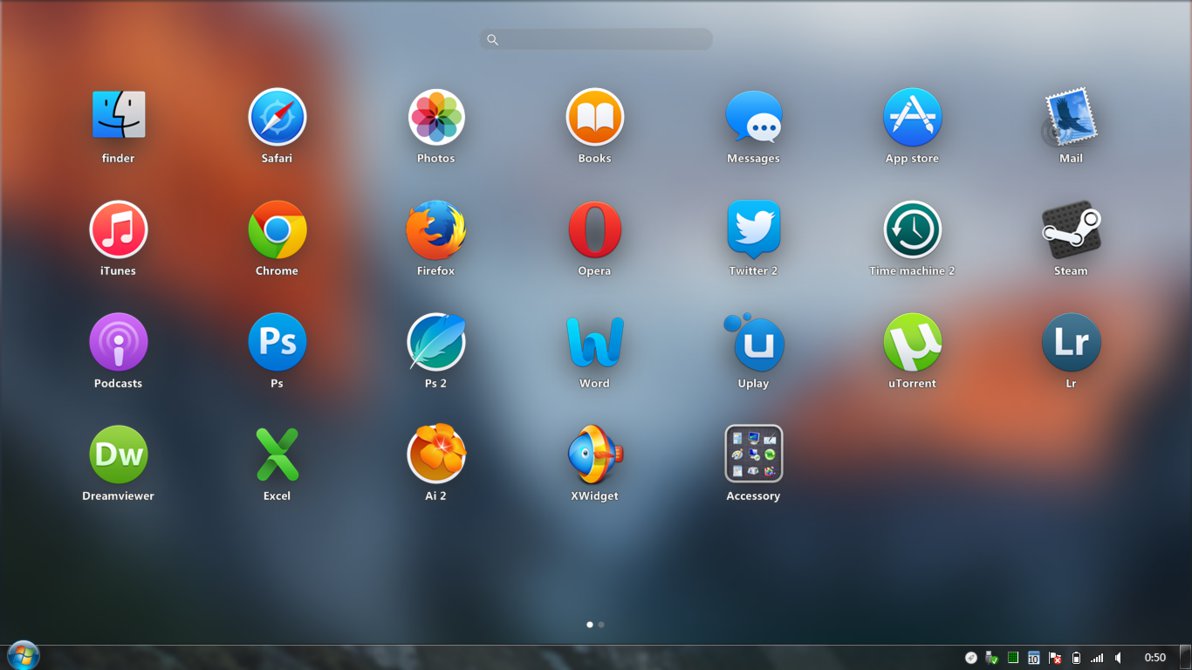
Perfectionism - this word says it all! After all, this program allows you to group all your randomly scattered shortcuts on the desktop in Launchpad, which will be triggered by a single click of a button or by moving the mouse. In fact, this is an alternative to what we see in OS X operating systems, which are used on numerous computers with the apple logo =) I think that it does not make sense to discuss the advantages of this program or its disadvantages, since if you are a perfectionist like me), then just buy this program and you will enjoy the new functionality on your Windows PC! If you are not a perfectionist, then you just do not understand the meaning of this program, and you can safely go on to good games or programs that are around! 10/10 perfectionist dreams.
XLaunchpad
- Release Date:
- Jan 10, 2019
- Developer:
- XDesktopSoft
- Publisher:
- XDesktopSoft
- Platforms:
- Windows
Game Tags
About This Game
XDesktopSoft COLLECTION
About the Software
XLaunchpad gives you instant access to all your shortcuts.Arrange apps in XLaunchpad any way you like by dragging icons to different locations or by grouping apps in folders. Simply drag one icon over another to create a folder. you can name the folder whatever you like when you open the folder.FEATURES
- Support desktop mode,turn your desktop into an iPad
- Instant access to all your shortcuts Without returning to the desktop.
- Support Multi-page scrolling.
- Support screen corner hot zone to activate.
- Simply drag one icon over another to create folder.
Screenshots
User Reviews
If you're using 4K monitor/resolution, they will look pixelated so much and if you active the HDR the app crashes.
does not look like the pictures showin here after i installed it this program does not uninstall very clean it leaves traces that you have to delete manully
~this software interferes with other running apps ( full screen games, etc.), this malware has been uninstalled and still will not go away
This Application will bring your boring old desktop screen to the next level.
This is a nice software, but i refound it because MyDockFinder has this option and other like finder and dock.
in its current state i cant recommend this, it needs to be disconnected from steam in a way that doesn't interfere with launching it via shortcut, launching it via a shortcut will tell you its already running through steam and will not launch, making it unusable. this needs fixing ASAP if it's gonna be a usable product. Otherwise it's polished and looks lovely. I would prefer some theming options though as the folder icon and background look rather dated.
Easy to use and customizable
Realy nice possibilities to personalize it! BUT If you switch between sites its lagging hard. Even speed it up via internal settings or via Taskmanager doesnt help. If you try to change a icon of a folder, it doesnt take the change. Not as Png. or Jpg. Both problems cant be solved with restarting (the program and computer) or by checking the gamefiles for errors. Also reinstall wont help.
No way to bind it to a folder and no mechanic for retaining secondary icon targets (when icon target is not same as exe target).
Page 1 of 2
System Requirements
Minimum
- OS *: Windows 7 / 8 / 8.1 / 10
- Memory: 128 MB RAM
- Storage: 128 MB available space
FAQ
How much does XLaunchpad cost?
XLaunchpad costs $3.99.
What are the system requirements for XLaunchpad?
Minimum: Minimum: OS *: Windows 7 / 8 / 8.1 / 10 Memory: 128 MB RAM Storage: 128 MB available space
What platforms is XLaunchpad available on?
XLaunchpad is available on Windows PC.
Is XLaunchpad worth buying?
XLaunchpad has 59% positive reviews from 39 players.
When was XLaunchpad released?
XLaunchpad was released on Jan 10, 2019.
Similar Games
AI-powered recommendations based on game description